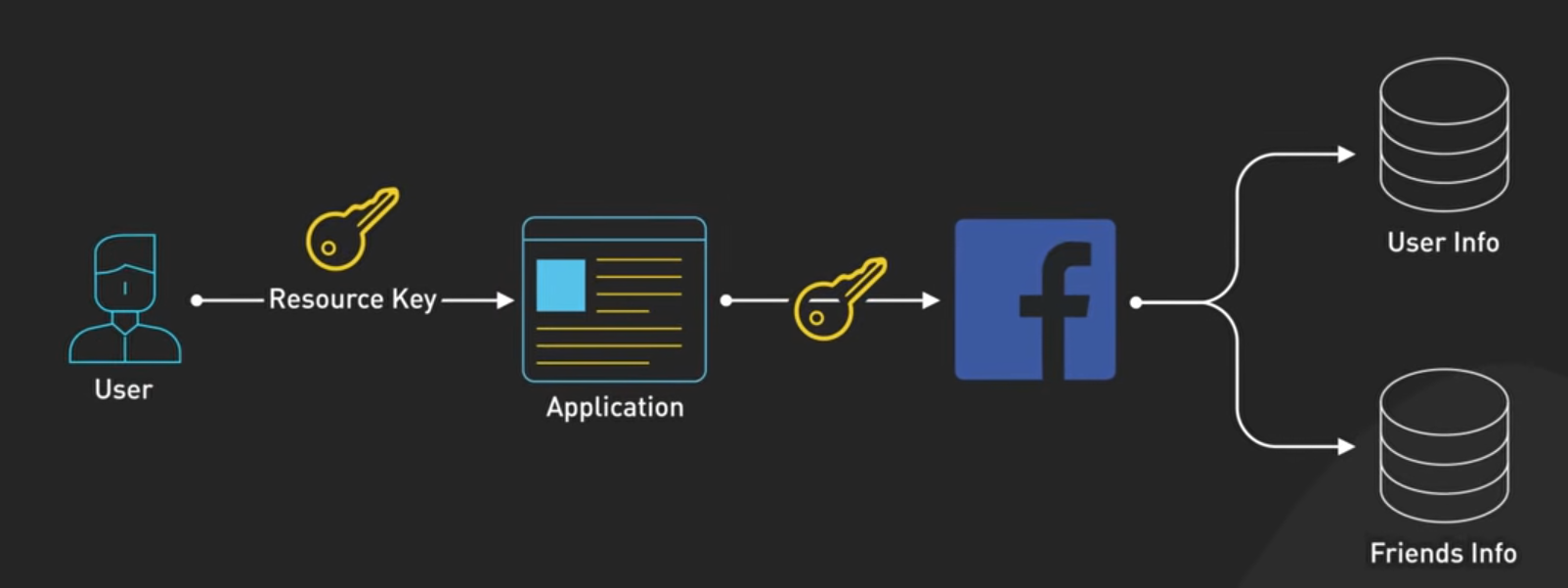
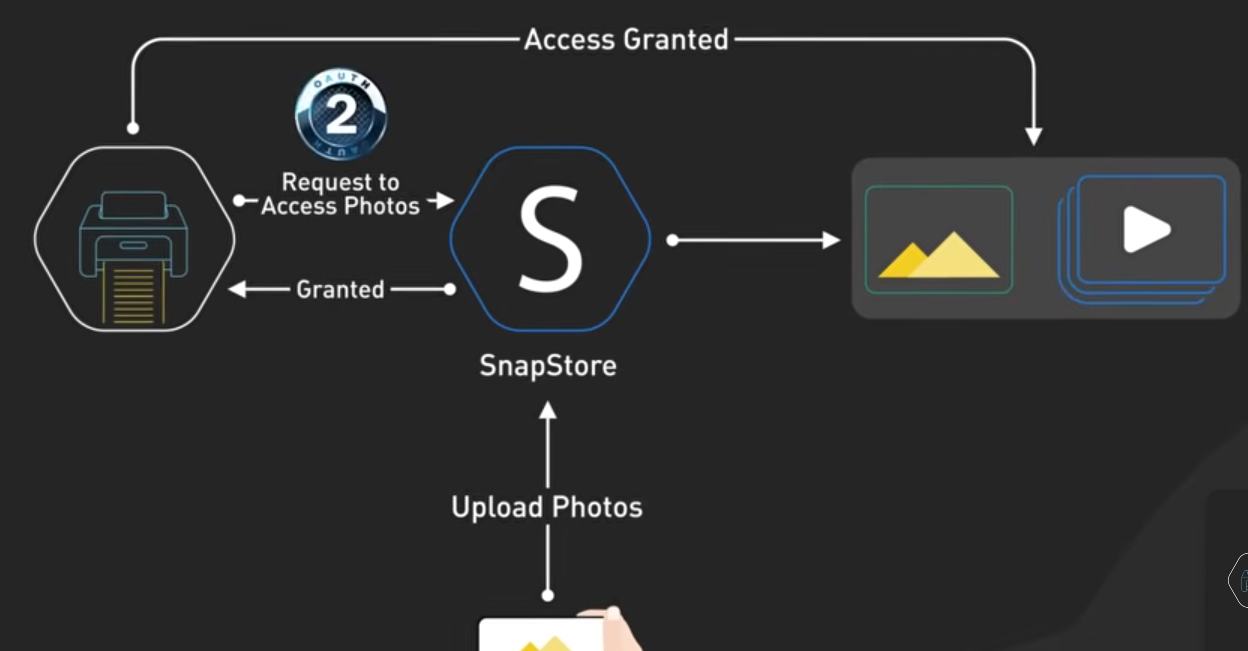
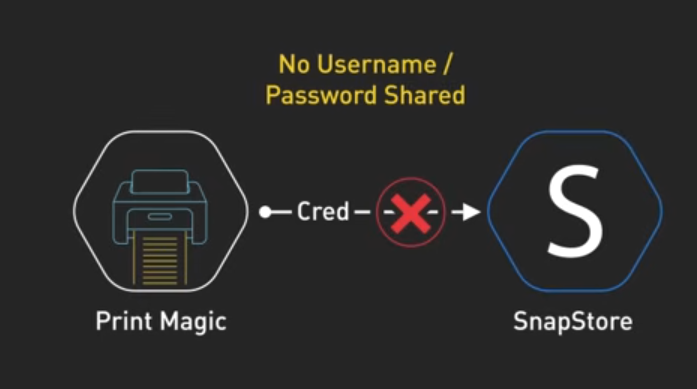
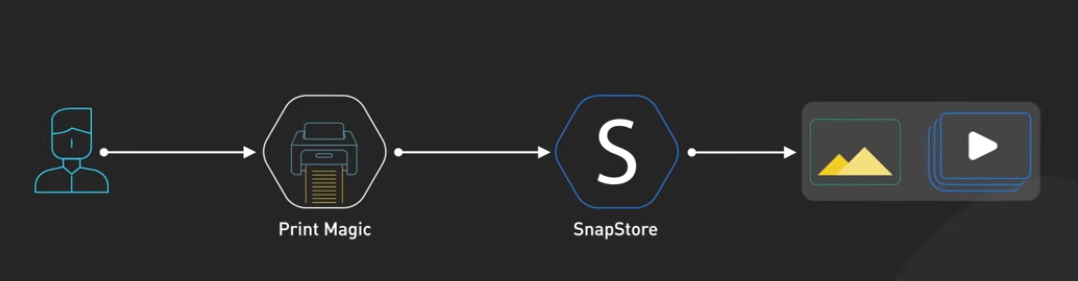
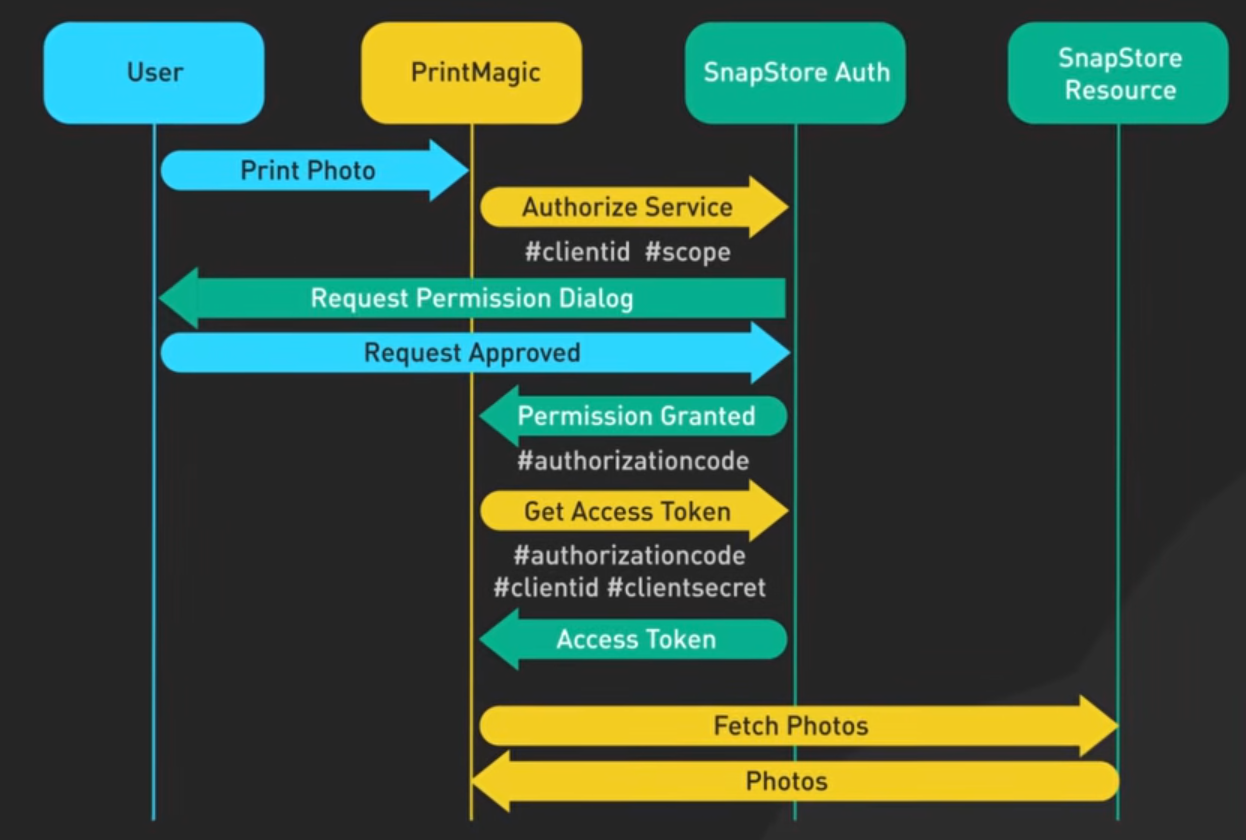
توضیحات ریکوئست ها نوشته شود
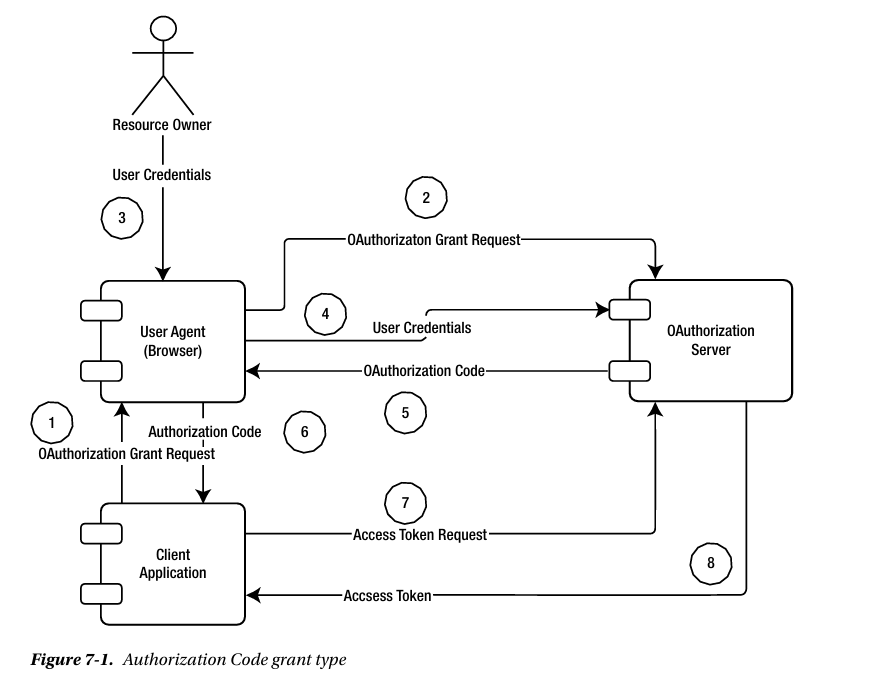
https://www.youtube.com/watch?v=7jkqLGMFDlw
https://www.youtube.com/watch?v=ZV5yTm4pT8g
https://www.youtube.com/watch?v=Tt1yhov8GR8
https://www.youtube.com/watch?v=B-6jYhzG0FE
https://www.youtube.com/watch?v=NRU_KdUSjD4
https://www.youtube.com/watch?v=mOsVR7SoumQ
https://www.youtube.com/watch?v=tpIXmmV4ib4
https://www.membrane-api.io/security/oauth2-using-postman/
https://learning.postman.com/docs/use/send-requests/authorization/oauth-20/
https://community.postman.com/t/oauth2-callback-not-doing-anything/63009
https://community.postman.com/t/set-up-listener-for-oauth2-0-callbacks/43876
https://community.postman.com/t/postman-oauth-2-missing-parameter-code-with-openid-connect/70274
https://community.postman.com/t/oauth-2-0-web-authentication/34561
https://learning.postman.com/docs/use/send-requests/authorization/oauth-20
https://community.postman.com/t/how-to-perform-oauth2-with-postman/3831
https://www.youtube.com/watch?v=zHfR96IZECQ
https://blog.postman.com/what-is-oauth-2-0/
https://community.postman.com/t/needing-help-with-oauth-2-0-and-session-based-authorisation/25802
https://community.postman.com/t/oauth-2-the-endpoint-only-accepts-post-options-requests/55367/4
https://community.postman.com/t/automation-of-oauth2-0-token/62500
https://dev.sprinklr.com/oauth-2-0-using-postman
https://7learn.com/blog/guide-to-implementing-oauth2
https://virgool.io/@mojir/%D8%A2%D9%85%D9%88%D8%B2%D8%B4-oauth-2-ak5bbxh5b1ds
خوب حالا میرسیم به بررسی کد ها
    string metadataAddress = "https://SITE/gateway/sso/.well-known/openid-configuration";

    // 2. Create a configuration manager that will fetch and cache the OIDC metadata
    var configManager = new ConfigurationManager<OpenIdConnectConfiguration>(
        metadataAddress,
        new OpenIdConnectConfigurationRetriever(),
        new HttpDocumentRetriever { RequireHttps = true }
    );

    // 3. Get the configuration (this automatically caches the JWKS)
    OpenIdConnectConfiguration config = await configManager.GetConfigurationAsync(CancellationToken.None);

    // 4. Define the validation parameters
    var validationParameters = new TokenValidationParameters
    {
        ValidateIssuer = true,
        ValidIssuer = "https://SITE",

        ValidateAudience = true,
        ValidAudience = merchantId,

        ValidateLifetime = true,
        ClockSkew = TimeSpan.FromMinutes(5), // Allow a small clock skew

        ValidateIssuerSigningKey = true,
        IssuerSigningKeys = config.SigningKeys, // Uses the keys from the metadata

        // Optional: Validate the signing algorithm
        ValidAlgorithms = new[] { SecurityAlgorithms.RsaSha256 }
    };

    // 5. Use JwtSecurityTokenHandler to validate the token
    var tokenHandler = new JwtSecurityTokenHandler();
    try
    {
        // This will throw if the token is invalid
        SecurityToken validatedToken;
        ClaimsPrincipal principal = tokenHandler.ValidateToken(idToken, validationParameters, out validatedToken);

        // 6. Access claims from the validated principal
        var jwtToken = validatedToken as JwtSecurityToken;
        Console.WriteLine("✅ Token fully valid");
        Console.WriteLine($"sub:    {jwtToken?.Subject}");
        Console.WriteLine($"name:   {principal.FindFirst("name")?.Value}");
        Console.WriteLine($"mobile: {principal.FindFirst("mobile")?.Value}");
    }
    catch (SecurityTokenException ex)
    {
        Console.WriteLine($"❌ Token validation failed: {ex.Message}");
        // Handle the exception (e.g., log it, return 401)
    }
}
var configManager = new ConfigurationManager<OpenIdConnectConfiguration>( metadataAddress, new OpenIdConnectConfigurationRetriever(), new HttpDocumentRetriever { RequireHttps = true } );
-
What it does: Instantiates a component that manages network requests to fetch the OIDC configuration.
-
Key Features:
-
RequireHttps = true: Enforces TLS encryption so public keys cannot be intercepted or modified in transit. -
Automatic Caching:
ConfigurationManagercaches the document in memory (by default, refreshed periodically or upon key rotation failures) so your application does not make an HTTP request on every token validation call.
-
خوب اینجا ما Require Https رو فعال کردیم برای این که TLS رو اعمال کنیم برای این که کسی نتونه public key رو دریافت کنه یا تغییرش بده توی زمان رفت و برگشت
خوب اینجا Configuration managere میاد document رو توی مموری ذخیره میکنه - خوب اینطوری دیگه نمیخواد برای هر token validation بریم درخواست http بزنیم
In Microsoft’s identity libraries (Microsoft.IdentityModel.Protocols.OpenIdConnect), OpenIdConnectConfigurationRetriever is an implementation of an interface named IConfigurationRetriever<OpenIdConnectConfiguration>.
Its sole responsibility is to download, parse, and convert raw JSON text from an OpenID Connect metadata endpoint into a strongly typed C# OpenIdConnectConfiguration object.
خوب OpenIdConnectConfigurationRetriever استفاده میشه برای این که اون text json ای که از open id connect میاد رو دانلود کنه بعد parse اش کنه و بعد تبدیلش کنه به کلاس OpenIdConnectConfiguration
In Microsoft’s identity libraries (Microsoft.IdentityModel.Protocols), HttpDocumentRetriever is an implementation of the IDocumentRetriever interface.
Its sole job is to handle the low-level HTTP networking layer required to fetch raw configuration documents (like JSON metadata or JWKS key sets) over the web.
خوب HttpDocumentRetriever برای این استفاده میشه که بیاد اطلاعات خام configuration document رو مثل json metadata , jwks رو بیاد بگیره
OpenIdConnectConfiguration config = await configManager.GetConfigurationAsync(CancellationToken.None);This line executes the actual asynchronous fetch (or cache lookup) to retrieve the OpenID Connect identity provider’s configuration and public signing keys.
Key Mechanics
1. What Happens When Called
-
First Call (Cache Miss): The
configManagertriggers two network operations viaHttpDocumentRetriever:-
Downloads the JSON metadata document from
.well-known/openid-configuration. -
Extracts the
jwks_urifield and downloads the public keys published by the identity server.
-
-
Subsequent Calls (Cache Hit): It returns the previously fetched and parsed
OpenIdConnectConfigurationdirectly from memory without making a network request.
خوب این لاین اصل کاره که میاد درخواست یا همون request رو میزنه برای گرفتن تنظیمات open id connect provider و public siging keys
خوب حالا ما با استفاده از config manager میایم دو تا درخواست میزنیم با http decoument retriver خوب نکته اینجاست که اگر از قبل ما open id connect configuration رو گرفتیم و توی memory داریمش میتونیم ازش استفاده کنیم و دیگه نیازی به reqest زدن برای گرفتن دوباره اون ها نداریم
2. What config Contains
The returned OpenIdConnectConfiguration object holds properties extracted from the OpenID Connect discovery document, including:
C#
config.Issuer          // "https://SITE"
config.JwksUri         // "https://SITE/gateway/sso/.well-known/openid-configuration/jwks"
config.SigningKeys     // Collection of SecurityKey objects (RSA public keys)
خوب با این درخواستی که میزنیم این ها رو میگیریم میزنیم توی config که از کلاس OpenIdConnectConfiguration هستش
3. How It Is Used in Your Code
In your method, the retrieved public keys are passed directly into the validation rules:
C#
IssuerSigningKeys = config.SigningKeysWhen tokenHandler.ValidateToken(...) runs, it uses config.SigningKeys to cryptographically verify that your incoming JWT was signed by the matching private key on the identity provider.
وقتی که tokenHandler ValidateToken اجرا میشه میاد از config signing key استفاده میکنه برای cryptography که چک کنه jwt که گرفتیم رو حالا میاد این رو چک میکنه که private key چک میکنه
Internal Caching & Refresh Logic
ConfigurationManager manages the key lifecycle automatically behind this method call:
- Automatic Expiration: By default, it caches the configuration in memory for 24 hours (
AutomaticRefreshInterval).
خوب موردی که هست اینه که گفته به صورت دیفالت ConfigurationManager میاد 24 ساعت این اطلاعات رو نگه میداره مگه اینه که خودمون بیایم با استفاده از AutomaticRefreshInterval تغییرش بدیم
- Key Rotation Failure Recovery: If an incoming token uses a key ID (
kid) that is not present inconfig.SigningKeys(for example, right after the authorization server rotates its keys),GetConfigurationAsynccan automatically force a refresh from the network (governed byRefreshInterval, default 30 seconds) to obtain the updated key set.
خو یه مورد مهمی که اینجا داره میگه اینه که اگر ما داریم از token ای استفاده میکنیم که اون key id یا kid داره که اون توی config singign keys وجود نداره - به طور مثال authurization server بیاد و کلید رو عوض کنه - توی این حالت get configuration async میتونه به صورت اتوماتیک رفرش کنه برای گرفتن کلید - که این زمان رفرش رو ما با refresh interval تعیین میکنیم و به صورت دیفالت 30 ثانیه هستش
CancellationToken.None: PassingCancellationToken.Noneindicates that this asynchronous fetch task should not be canceled prematurely via a token.
TokenValidationParameters defines the exact security rules and checks that your C# application will enforce when evaluating an incoming JSON Web Token (JWT).
Think of this object as a checklist given to the token validator (JwtSecurityTokenHandler or JsonWebTokenHandler). If the token fails even a single check, it is rejected as invalid, and an exception is thrown.
خوب token validation parameter اینجا ما میتونیم بیایم قانون های چک امینیت رو تنظیم کنیم برای چک اون jwt که میاد
خوب به این object به چشم یه چک لیست میتونیم نگاه کنیم برای اون کلاس هایی که Validation token رو انجام میدن مثل jwt security token handler یا json web token handler اگر توکن fail بشه بهمون ارور میده یا یه excption بهمون میده
Detailed Breakdown of Every Field
1. Issuer Validation (ValidateIssuer & ValidIssuer)
C#
ValidateIssuer = true,
ValidIssuer = "https://Site",-
JWT Claim checked:
iss(Issuer) -
What it does: Verifies who created and signed the token.
-
Why it’s crucial: Prevents “token spoofing.” Without this, an attacker could set up their own identity server, issue a token with valid formatting, and trick your API into trusting them. Your API will only accept tokens where the
issclaim exactly matches"[https://SITE](https://SITE)".
خوب توی این فیلد داره میگه که باید issuer چک بشه و issuer هم که درسته مقدارش رو ما نوشتیم برای این استفاده میکنیم که جلوگیری کنیم از token spoofing - ممکنه هکر بیاد یه identity server برای خودش درست کنه و یه توکن رو با یه فرمت درست برامون بفرسته و api ما اینطوری بهش اعتماد میکنه - اگر از این مورد استفاده نکنیم
اینطوری api ما فقط درخواست هایی که از سمت SITE میاد و iss شون SITE هستش رو میپذیره
2. Audience Validation (ValidateAudience & ValidAudience)
C#
ValidateAudience = true,
ValidAudience = merchantId,-
JWT Claim checked:
aud(Audience) -
What it does: Verifies for whom the token was issued.
-
Why it’s crucial: Prevents “token replay” across different clients. If User A logs into App 1, App 1 shouldn’t be able to steal that token and use it against App 2/Merchant B. By checking that
audmatches your specificmerchantId, you ensure the token was explicitly intended for your app. خوب اینجا داره میگه که برای این جلوگیری از token reply بین کاربران مختلف میایم از این مورد استفاده میکینم - اگر یوزر A بیاد وارد app1 بشه ، دیگه app1 نمیتونه توکن رو بدزده و برای app2 ازش استفاده کنه
خوب برای چک کردنش ما میایم aud رو چک میکنیم که ببینیم این aud با merchent id مطابق هستش یا نه - اینطوری مطمئن میشیم که این توکن فقط و فقط برای برنامه ما هستش
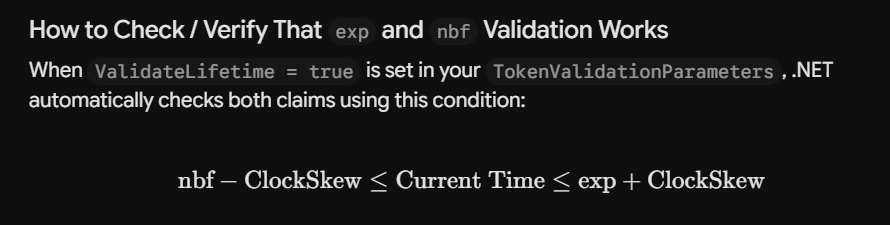
Expiration & Time Checking (ValidateLifetime & ClockSkew)
C#
ValidateLifetime = true,
ClockSkew = TimeSpan.FromMinutes(5),-
JWT Claims checked:
exp(Expiration Time) andnbf(Not Before) -
What
ValidateLifetime = truedoes: Rejects expired tokens (expin the past) or tokens not yet valid (nbfin the future). -
What
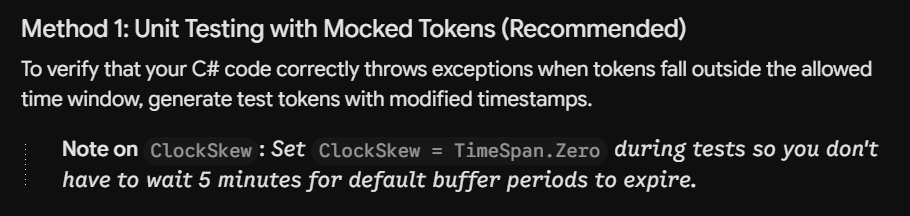
ClockSkewdoes: Sets a 5-minute grace period.-
Server clocks across different cloud hosts or data centers can drift by a few seconds or minutes.
-
A 5-minute skew means if an ID token expired at 12:00:00, your server will still accept it until 12:05:00 to avoid false rejection caused by slight server clock differences.
-
Production Tip: 5 minutes is the default in .NET, but for high-security applications, it is common to reduce this to 30 seconds or
TimeSpan.Zero. خوب توی این بخش میاد exp , nbf رو چک میکنه
-
─── Token NOT Valid Yet ───►[ nbf ]████ Token Valid Window ████[ exp ]─── Token Expired ───►
خوب اینجا ما میایم clock skew رو تنظیم میکنیم برای این که اگر تایم سرور ما و سروری که داره sso رو تامین میکنه متفاوت باشه - اینطوری به خطا نمیخوریم
4. Cryptographic Signature Validation (ValidateIssuerSigningKey & IssuerSigningKeys)
C#
ValidateIssuerSigningKey = true,
IssuerSigningKeys = config.SigningKeys,-
JWT Header checked:
kid(Key ID) and the raw digital signature attached at the end of the token string. -
What it does: Performs the core cryptographic math check.
-
How it works:
-
The identity server signs the token using its private key.
-
config.SigningKeyscontains the matching public keys fetched earlier from the.well-known/openid-configurationendpoint. -
The validator uses these public keys to prove that the token payload hasn’t been altered or forged since it left the identity server.
-
خوب حالا میرسیم به چک کردن validate issuer signin key and issuer signin key
1.خوب سرور احراز هویت توکن رو با کلید خودش امضا میکنه 2.خوب config sigin key کلید عمومی رو از well-known/openid-configuration گرفته 3.خوب validator میاد از همین کلید عمومی استفاده میکنه برای این که بیاد چک کنه که token payload دستکاری نشده باشه از موقعی که از identiy servewr ارسال شده
Algorithm Downgrade Protection (ValidAlgorithms)
C#
ValidAlgorithms = new[] { SecurityAlgorithms.RsaSha256 }-
JWT Header checked:
alg(Algorithm) -
What it does: Restricts acceptable signing algorithms specifically to
RS256(RSA with SHA-256). -
Why it’s crucial: Prevents algorithm downgrade attacks. Historically, security flaws existed where attackers could modify a JWT header to set
"alg": "none"(no signature check) or force a public key to be read as an HMAC secret ("alg": "HS256"). Explicitly declaringValidAlgorithmsblocks those malicious exploits at the framework level.
خوب در اخر هم تعیین میکنیم که با چه الگوریتیمی این عملیات انجام بشه
این تعیین کردن برای جلوگیری از حمله به سایت هستش
               var tokenHandler = new JwtSecurityTokenHandler();
               try
               {
                   // This will throw if the token is invalid
                   SecurityToken validatedToken;
                   ClaimsPrincipal principal = tokenHandler.ValidateToken(idToken, validationParameters, out validatedToken);

                   // 6. Access claims from the validated principal
                   var jwtToken = validatedToken as JwtSecurityToken;

               }
This section of your code performs the actual token verification and decodes the claims once validation succeeds.
Here is a line-by-line breakdown of what happens under the hood, how the outputs differ, and a few key edge cases to handle.
Step-by-Step Explanation
1. Instantiate the Handler
C#
var tokenHandler = new JwtSecurityTokenHandler();-
What it is:
JwtSecurityTokenHandleris the core execution engine provided bySystem.IdentityModel.Tokens.Jwt. -
Role: It parses the three-part JWT string (
Header.Payload.Signature) and runs all validation rules specified invalidationParameters.
خوب اینجا اصل کاره که tokrn verfication و decode کردن claim ها انجام میشه
خوب اول میایم handler رو درست میکنیم - JwtSecurityTokenHandler میشه هسته اصلی اجرا
خوب میاد 3 تا بخش jwt که header , payload , signuture هستش رو میگیره و روش validation رو احرا میکنه با استفاده از قانون هایی که توی validation parameters تنظیم کردیم
2. Perform Validation (ValidateToken)
C#
SecurityToken validatedToken;
ClaimsPrincipal principal = tokenHandler.ValidateToken(idToken, validationParameters, out validatedToken);
This single line executes all cryptographic and logical checks:
-
Format Check: Verifies that
idTokenis a valid, well-formed, base64-encoded JWT. -
Signature Check: Uses public keys (
validationParameters.IssuerSigningKeys) to recalculate the HMAC/RSA signature overHeader.Payloadand checks if it matches the signature on the incoming token. -
Issuer & Audience Checks: Ensures
issequalsValidIssuerandaudequalsValidAudience. -
Lifetime Check: Confirms .
خوب این یه خط میاد تموم cryptografy رو انجام میشده و لاجیک رو چک میکنه
خوب میاد چک میکنه id token رو که ساختارش درست باشه و base 64 encoded jwt باشه
میاد از public key که توی validationParameters IssuerSigningKeys هست استفاده میکنه برای این که محاسبه کنه header payload رو با امضای HMAC/RSA و چک میکنه امضای توکنی که اومده رو
What happens if it fails?
It throws an exception inheriting from SecurityTokenException (e.g., SecurityTokenExpiredException, SecurityTokenInvalidSignatureException).
خوب اگر fail بشه Exception میفرسته
What happens if it passes?
It populates two distinct output objects:
-
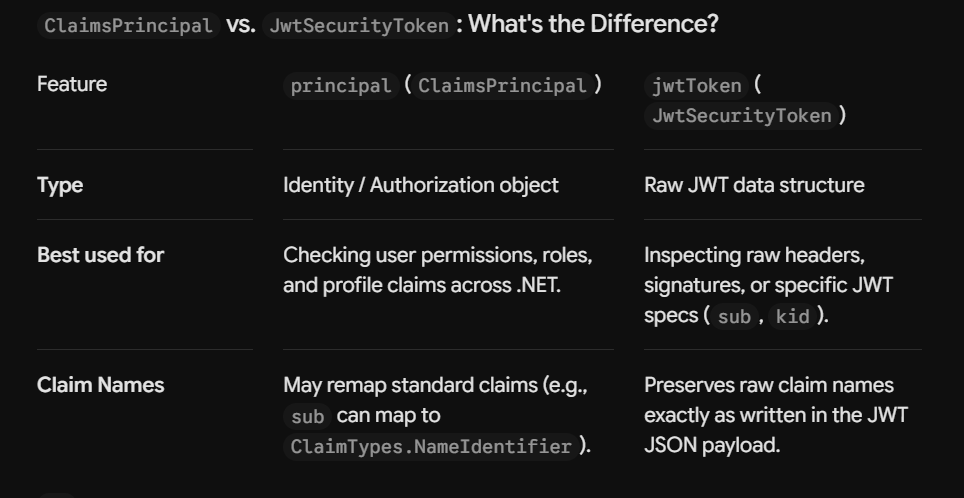
principal(ClaimsPrincipal): A high-level .NET object containing user claims mapped to standard C# security identities. This is what ASP.NET Core uses for authorization (User.Identity,User.IsInRole(...)). -
validatedToken(out SecurityToken): The low-level, validated token instance representing the raw structure of the token.
اگر اوکی بشه دو تا خروجی بهمون میده principal رو که شامل user claim هایی هست که مپ شدن به C# security identity
خوب asp .net core میاد از اینها برای authorization استفاده میکنه
خوب validate token میاد token چک و بررسی میکنه ساختارش رو
Cast to JwtSecurityToken
C#
var jwtToken = validatedToken as JwtSecurityToken;-
Why cast?
SecurityTokenis an abstract base class. Casting it toJwtSecurityTokengives you direct access to JWT-specific properties that aren’t exposed on generic security tokens, such as:-
jwtToken.Header(algorithm, key IDkid) -
jwtToken.Subject(subclaim) -
jwtToken.ValidFrom(nbfdate) -
jwtToken.ValidTo(expdate)
-
خوب بعدش میایم cast اش میکنیم ، چرا ؟ چون security token یه base clas هستش و ما میایم cast اش میکنیم که بتونیم به یه سری از خصوصیات jwt که به صورت generic expose نمیشن رو اینطوری بهشون میتونیم دسترسی پیدا کنیم
Modern Alternative: JsonWebTokenHandler
In modern .NET applications (.NET 6+), Microsoft recommends using JsonWebTokenHandler instead of JwtSecurityTokenHandler.
var tokenHandler = new JsonWebTokenHandler();

TokenValidationResult result = await tokenHandler.ValidateTokenAsync(idToken, validationParameters);

if (result.IsValid)
{
    // Create a ClaimsPrincipal from the valid ClaimsIdentity
    var principal = new ClaimsPrincipal(result.ClaimsIdentity);

    // Now you can access claims as usual
    string? name = principal.FindFirst("name")?.Value;
    string? mobile = principal.FindFirst("mobile")?.Value;

    // Access raw JWT properties directly from SecurityToken
    if (result.SecurityToken is JsonWebToken jwtToken)
    {
        Console.WriteLine($"sub: {jwtToken.Subject}");
    }
}
else
{
    Console.WriteLine($"❌ Token validation failed: {result.Exception?.Message}");
}
https://crosscheck.cloud/blogs/cookies-vs-jwt-authentication-2026/
https://www.youtube.com/watch?v=sGki5PRJkZk
https://www.youtube.com/watch?v=ROg1p0UZL0M
https://www.youtube.com/watch?v=DmUTFYEvsgU
https://www.youtube.com/watch?v=Qm64zinOVpc
https://www.youtube.com/watch?v=d8liHExs5tc
https://www.youtube.com/watch?v=vq861XoZI9k
https://www.youtube.com/watch?v=VpEexGvZWSQ
https://github.com/DavidEggenberger/BlazorWebAssemblyOidc
https://eksekki.medium.com/openid-connect-with-net-core-2-jboss-keycloak-3fd83c30564c
https://svrooij.io/2024/02/22/validate-jwt-openid-connect/
https://dev.to/nikhilwagh/securing-aspnet-core-apis-with-oauth2-and-openid-connect-2025-edition-4j1c